
Clip Lyra

Source Ingestion & Plan Limits

Upload files, import YouTube or URL sources, and enforce package limits before processing starts.

ClipLyra accepts local video uploads, YouTube links, and remote URLs while checking storage, duration, source resolution, target short length, language, and maximum clips for the current package.

Presigned or local upload URLs Safe filename handling YouTube probing with yt-dlp SSRF-safe remote URL checks Audit events for upload and ingest actions
Ask about this feature All features

Feature details

What is included.

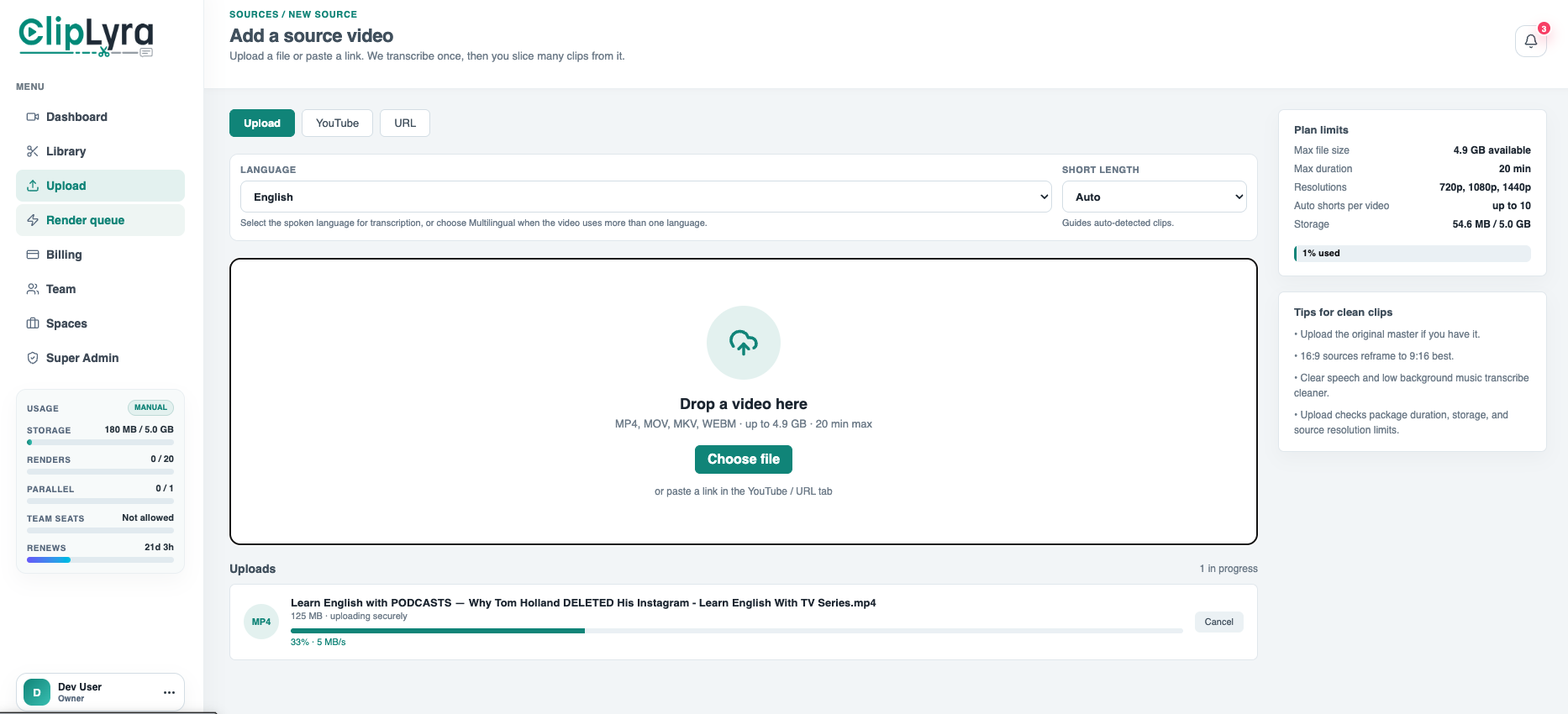
The upload workflow gives users tabbed Upload, YouTube, and URL options, language selection, short-length targeting, plan-limit guidance, and visible upload progress.

Backend source routes validate subscription status, storage capacity, upload duration, source resolution, public URL safety, and YouTube metadata before enqueueing processing work.

  • Upload, YouTube, and URL ingestion paths
  • Language and auto short-length controls
  • Preflight checks for storage, duration, and resolution
  • Upload progress, cancel state, and source status history

Included capabilities

Presigned or local upload URLs Safe filename handling YouTube probing with yt-dlp SSRF-safe remote URL checks Audit events for upload and ingest actions
Product page Pricing table

Ask about Source Ingestion & Plan Limits

Tell us how this feature should work for your team, product package, or white-label customer.

Detailed feature breakdown

How Source Ingestion & Plan Limits works inside Clip Lyra.

This section explains the actual workflow, controls, and buyer value behind this feature.

Source intake that validates work before processing

ClipLyra supports three source paths: direct video upload, YouTube import, and remote media URL import. The intake flow is built around practical production controls such as source tabs, language selection, target short length, maximum clip count, upload progress, and visible status history.

The product checks the source before it starts expensive transcription or rendering work. That means a customer sees whether the current package can accept the file, duration, source resolution, storage footprint, and requested short length before the queue is loaded.

  • Upload, YouTube, and remote URL paths are handled as first-class source types.
  • Language, target duration, max clips, and source metadata are captured at intake.
  • Storage, duration, resolution, and subscription limits are checked before processing starts.

Safe media acquisition for SaaS operators

The ingestion layer protects the platform from unsafe or unusable sources. Local uploads use controlled upload URLs, filenames are normalized, YouTube sources are probed before processing, and remote URLs are checked as public media before the system accepts them.

This makes the feature suitable for a subscription SaaS where many customers may be importing external content at the same time. The platform can reject invalid sources early instead of letting bad media reach the worker pipeline.

  • Local upload support can work with presigned or local storage flows.
  • Remote URL checks reduce unsafe fetches and invalid media imports.
  • Ingestion actions can be audited so admins can trace source creation and processing attempts.

Package-aware onboarding for each video source

Every imported source is tied to package entitlement rules. A creator on a smaller plan can be guided toward shorter uploads or lower output limits, while higher-tier workspaces can unlock longer source videos, more clips, more storage, and higher output resolutions.

  • Plan limits are part of the upload experience, not hidden after failure.
  • The same source model supports creator accounts, agencies, and white-label SaaS operators.
  • Rejected sources can be explained with business-friendly limit messages.

Screenshots

Source Ingestion & Plan Limits in the actual product.

Upload workspace with source tabs, plan limits, upload progress, language, and short-length controls.

More Clip Lyra features

Related feature pages.

Transcript Review & Short Selection

The review workflow turns transcription into a production interface: searchable transcript blocks, word chips, speaker summaries, save/export controls, and one-click clip creation from strong moments.

Open feature

Short Editor, Layer Assets & Frame Preview

ClipLyra includes an editor layer for vertical outputs, caption style data, crop keyframes, media layers, image/video/audio uploads, and preview frames with optional watermarking.

Open feature

Render Queue & Output Operations

Rendering is separated from editing through worker queues, render job status, progress, attempts, usage ledger entries, output assets, notifications, and operational queue views.

Open feature

Billing, Usage & Team Workspaces

The product includes subscription and usage controls for storage, monthly renders, concurrent renders, max upload duration, max short length, preview/export resolutions, layer limits, team members, and yearly renewal state.

Open feature

Super Admin Platform Control

ClipLyra includes a global admin layer for users, workspaces, subscriptions, revenue, storage, renders, package management, coupons, transactions, all library items, all shorts, logs, resolutions, alerts, emails, and application settings.

Open feature