Clip Lyra

Render Queue & Output Operations

Queue renders, track progress, enforce concurrency, and notify users when outputs are ready.

Rendering is separated from editing through worker queues, render job status, progress, attempts, usage ledger entries, output assets, notifications, and operational queue views.

Render usage ledger Active render sidebar widget Retry/cancel-ready status model Notification feed Output asset tracking
Ask about this feature All features

Feature details

What is included.

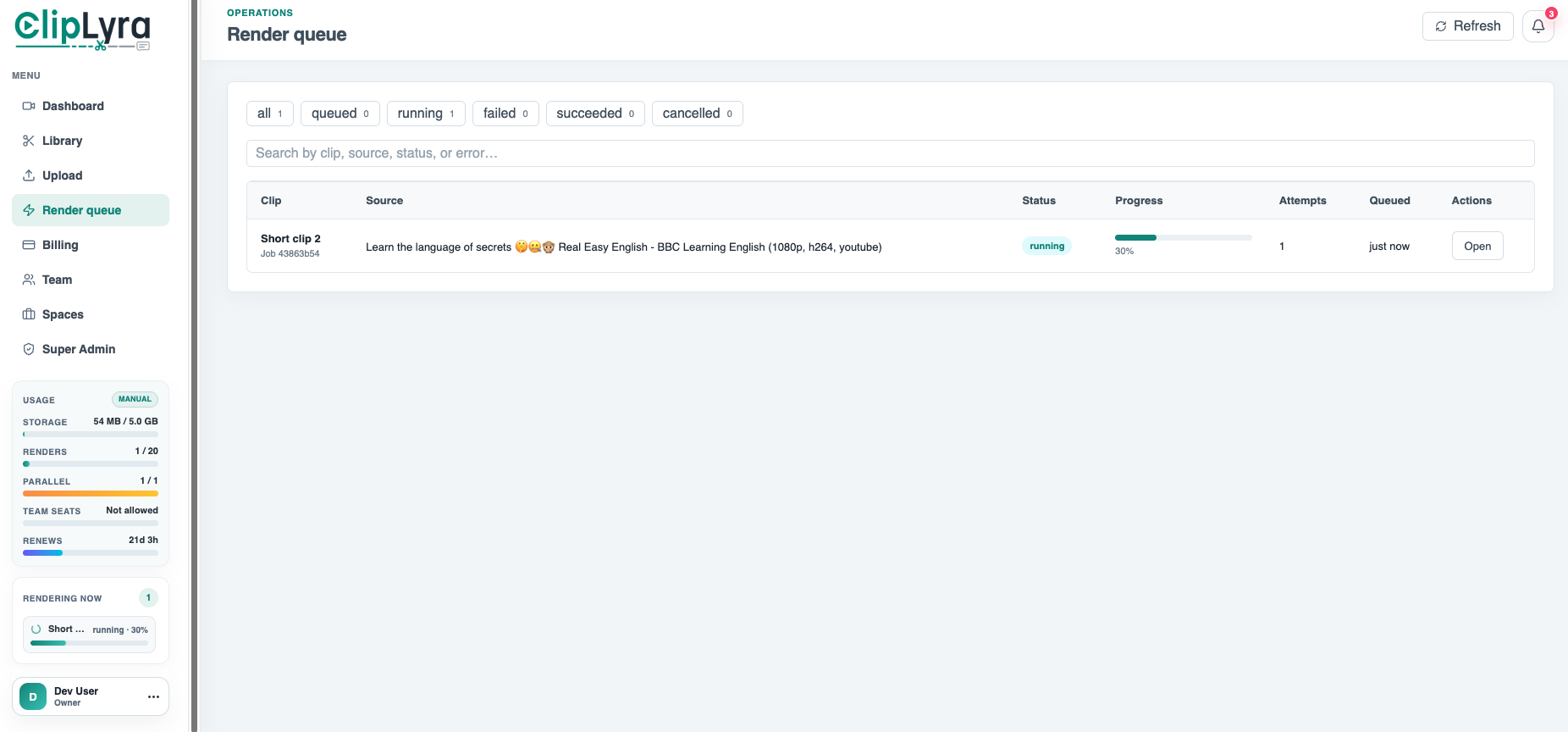
The render queue shows all, queued, running, failed, succeeded, and cancelled states with search, progress, attempts, queued time, and open actions.

Worker code slices clips, rebases transcript words and crop keyframes after cuts, renders captions/layers, records render usage, and creates notifications when a render finishes.

  • Queued, running, failed, succeeded, and cancelled states
  • Progress bars, attempts, and render job lookup
  • Concurrency and monthly render-limit enforcement
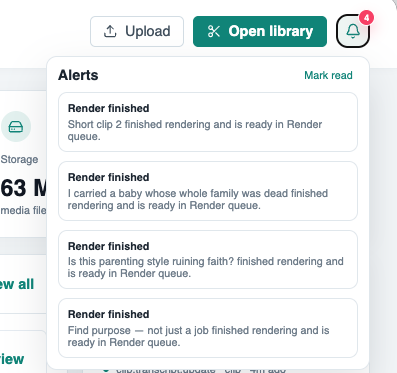
  • Render-finished alerts and output availability

Included capabilities

Render usage ledger Active render sidebar widget Retry/cancel-ready status model Notification feed Output asset tracking
Product page Pricing table

Ask about Render Queue & Output Operations

Tell us how this feature should work for your team, product package, or white-label customer.

Detailed feature breakdown

How Render Queue & Output Operations works inside Clip Lyra.

This section explains the actual workflow, controls, and buyer value behind this feature.

Queue-based rendering for production reliability

ClipLyra separates editing from rendering through a render job model. Jobs move through queued, running, succeeded, failed, and cancelled states, while the UI can show progress, attempts, queue time, status filters, and open actions.

  • Render jobs are trackable instead of blocking the editor interface.
  • Queue filters help users and admins see what is waiting, running, or failed.
  • Attempts and progress make failed renders easier to diagnose.

Output assembly from transcript, crop, captions, and layers

The render workflow is built to output edited short clips, not just trimmed videos. It slices the selected clip window, rebases transcript words after removed sections, applies crop keyframes, draws captions, composes layer assets, and writes the final social video asset.

  • Transcript timing is adjusted after cuts so captions stay aligned.
  • Crop keyframes and layer assets are applied during final composition.
  • Output assets stay connected to the render job and source short.

Operational controls for a subscription video SaaS

Rendering is also connected to package enforcement and user notifications. The platform can check monthly render usage, active render limits, and concurrency before starting work, then notify users when an output is ready.

  • Monthly render usage and active render limits protect worker capacity.
  • Render completion notifications reduce support questions.
  • Admin queue views help operators manage render volume across tenants.

Screenshots

Render Queue & Output Operations in the actual product.

Render queue with filters, search, status, progress, attempts, and queued time.
User notification popover showing completed render alerts.

More Clip Lyra features

Related feature pages.

Source Ingestion & Plan Limits

ClipLyra accepts local video uploads, YouTube links, and remote URLs while checking storage, duration, source resolution, target short length, language, and maximum clips for the current package.

Open feature

Transcript Review & Short Selection

The review workflow turns transcription into a production interface: searchable transcript blocks, word chips, speaker summaries, save/export controls, and one-click clip creation from strong moments.

Open feature

Short Editor, Layer Assets & Frame Preview

ClipLyra includes an editor layer for vertical outputs, caption style data, crop keyframes, media layers, image/video/audio uploads, and preview frames with optional watermarking.

Open feature

Billing, Usage & Team Workspaces

The product includes subscription and usage controls for storage, monthly renders, concurrent renders, max upload duration, max short length, preview/export resolutions, layer limits, team members, and yearly renewal state.

Open feature

Super Admin Platform Control

ClipLyra includes a global admin layer for users, workspaces, subscriptions, revenue, storage, renders, package management, coupons, transactions, all library items, all shorts, logs, resolutions, alerts, emails, and application settings.

Open feature